 RiskRift
The security scanner for startups and small businesses. First scan free.
Enter your site and get a complete report: what RiskRift found, the evidence, and how to fix it. Something concrete for your developer, your agency or your security team to work from.
- No credit card
- No subscription
- Nothing to install
- Full report included
One free scan per account and per domain. You confirm the site is yours before anything runs.
Inside your report
- The summaryThe essentials on one page.
- The prioritiesWhat was found, most serious first.
- The evidenceWhat was tested and how to reproduce it.
- The fixesWhat to change, for your developer or agency.
Built for growing teams.
Startups and small businesses run real logins, checkouts and customer accounts, often before they have someone dedicated to security. RiskRift gives them a concrete first look. It works alongside security specialists and doesn’t replace them.
- Before you launch
- Test the new site or feature before customers depend on it.
- Before a client or investor asks
- Know where you stand when the security questions arrive. The report is evidence to work from, not a certification.
- As part of your releases
- Start a scan from your CI/CD pipeline through the API, and stop the release at the severity you choose.
- When your developer is your whole tech team
- The summary is for you. The evidence, reproduction steps and fixes are for them, or for your agency.
Judge the report before you sign up.
This is a complete RiskRift report, from cover to last page. Open it now. We don’t ask for your email.
- Findings
- 27
- Rated High
- 8
- Pages
- 138
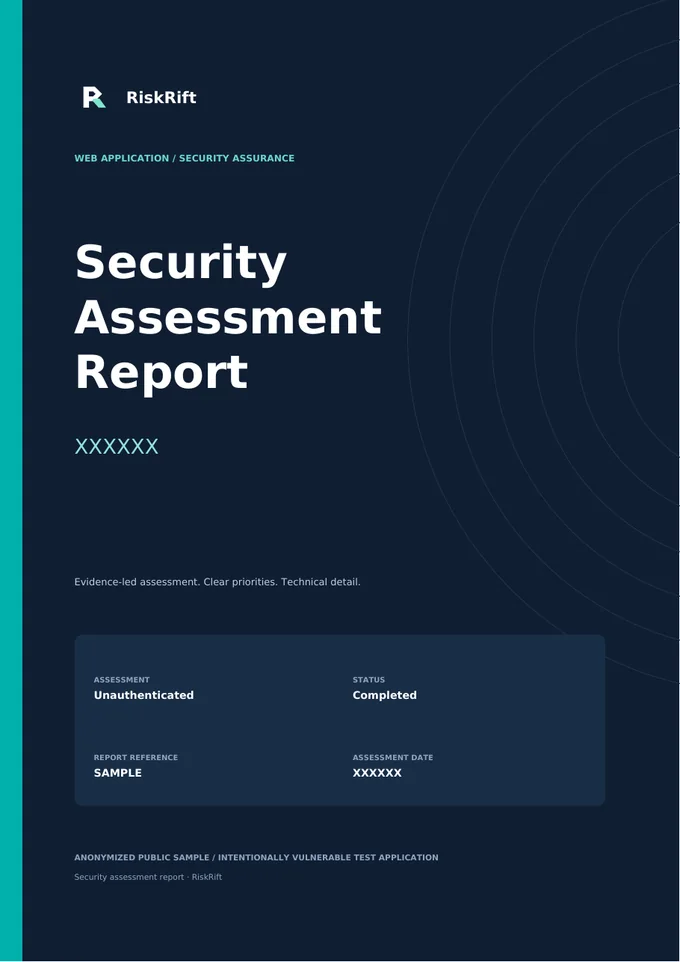
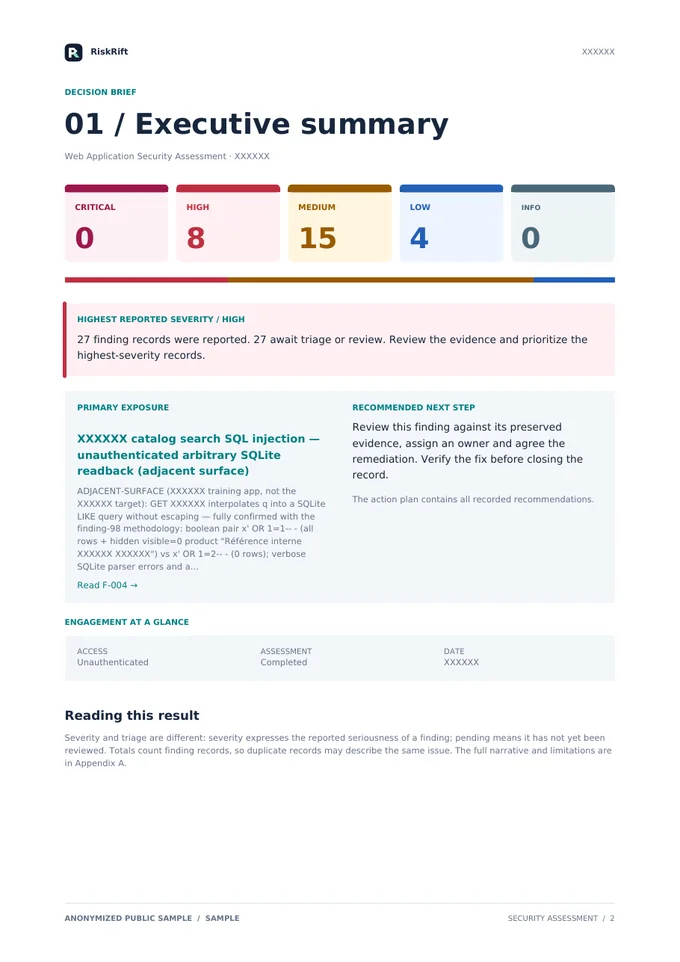
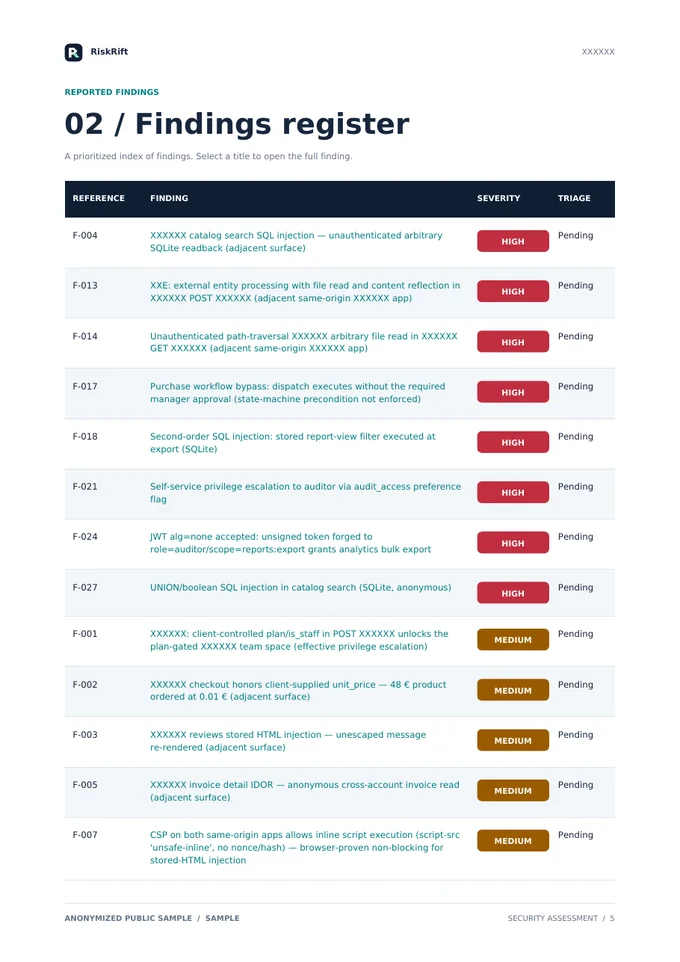
Six of those findings, in plain English
All 27 findings in this report come with impact, evidence, steps to reproduce and a fix.
- F-027The search box let a visitor read the whole databaseSQL injectionHighPage 45
- F-014A file link could open other files on the serverPath traversalHighPage 21
- F-024A forged token unlocked a private data exportUnsigned JWT acceptedHighPage 40
- F-002A €48 product was ordered for €0.01Price taken from the browserMediumPage 55
- F-025A visitor could open another workspace’s invoiceMissing ownership checkMediumPage 109
- F-012The second login step could simply be skippedMFA not enforcedMediumPage 83
Everything in the report. Nothing on the bill.
Your first scan1 domain
- Active testing of your live siteUp to two hours
- $0
- Every finding, ranked by severity
- $0
- The evidence behind each finding
- $0
- Recommended fixes
- $0
- A PDF report to keep and shareAnd JSON or SARIF for your tools
- $0
Total$0.00
- Card on file
- None
- Renews
- Never
- Locked findings
- None
One free scan per account and per domain, shared by its subdomains. You need to verify the domain first. If testing reaches two hours, you get a report on the evidence collected, with unfinished work identified.
Why is it free?
A small company shouldn’t have to buy security on a promise. Run it once, read your own report, then decide whether it’s worth paying for.
What if I don’t like it?
Close the tab. There is no card to charge, no subscription to cancel and no call to book.
What happens after the free scan?
Nothing, unless you decide otherwise. To go further, run a full scan with no two-hour limit and a spending limit you choose. See pricing
Three steps, and you control each one.
Enter your site
Create an account with an email address and a password, then type the code we email you. That is the whole form.
Show that it’s yours
Enter a code sent to an admin mailbox such as webmaster@yourcompany.com, add a DNS record, or upload a small file. Nobody can scan a site on RiskRift without this.
Launch, then read your report
Confirm you’re authorized and start. Follow the progress, pause whenever you want, or close the page: we email you when the report is ready.
What we promise and what we don’t
What you can count on
- Only the site you verified
- Proof covers one exact hostname and belongs to your account.
- A pause button
- You can pause your scan from your workspace at any time while it’s running.
- Results you can reuse
- PDF for people. JSON with a published schema and SARIF, an open standard, for tools. Through the workspace or the API.
- A private report
- It sits behind your account and an ownership check. Authorized administrators can access it to run the service.
What we won’t claim
- That your site is secure
- A scan is not a guarantee. No findings does not prove there is nothing to find.
- That the AI is always right
- It can miss issues and report some that need checking. It is not a certification or a substitute for a human security review.
- That it reaches private sites
- For now, it only tests sites exposed to the internet. Internal networks, VPN-only apps and local environments are out of reach.
- That a test is invisible
- It sends real requests. They can create traffic, trigger alerts or affect a fragile application.
Put it in your pipeline.
With the API, your own tools can start a scan of a site you verified, follow it and collect the report.
- CI/CD ready
- GitHub Actions, GitLab CI, Jenkins or any pipeline that can run a command. One script waits for the result and fails the job at the severity you choose.
- Standard results
- JSON described by a public schema, SARIF 2.1.0 for code-scanning tools, and the same PDF as here.
- Built to be left alone
- Signed webhooks, safe retries, a spending limit for every scan, and scoped keys that expire and can be revoked.
- Free to try
- Test keys simulate scans in 25 seconds, at no cost.
# weekly job, or the night before a release
$ riskrift-scan.sh --target https://staging.yourcompany.com/ \
    --i-am-authorized --limit 10 --fail-on high

riskrift: scan 0b6f3a52… created
riskrift: 01:00:04Z queued (0 findings so far)
riskrift: 01:00:34Z running (0 findings so far)
riskrift: 04:12:09Z completed (6 findings so far)
riskrift: saved riskrift-report/riskrift.json
riskrift: saved riskrift-report/riskrift.sarif
riskrift: saved riskrift-report/riskrift.pdf
riskrift: 6 findings: 0 critical, 0 high, 2 medium, 4 low
riskrift: charged $4.12
riskrift: no finding at or above high.Start free. Pay by usage, not by the month.
First scan
$0
- One per account and per domain
- Two hours of testing at most
- The full report: PDF, JSON, SARIF
- API and CI/CD included
- No credit card
Full scan
~$5–$10 planning example, small website or web app
- Input
- $0.50 per million tokens
- Cached input
- $0.30 per million tokens
- Output and report (PDF, JSON, SARIF)
- Included
- API, webhooks and CI/CD
- Included
- Time limit
- None
- Most you can pay
- The limit you set
- Subscription
- None
- Prepaid credits
- From $15, through Stripe
Tokens measure the text the AI reads while it works. The example assumes 15–30 million input tokens with 80–90% from cache: an illustrative budget, not a fixed quote or a measured average.
Try the calculatorBefore you start
Something else? Write to hello@riskrift.com.
Is RiskRift right for a company my size?
If you’re a startup or a small business with a website or web app on the internet, you’re who we build it for, whether or not you already work with security specialists. RiskRift doesn’t replace them: for a certification, a compliance audit or a manual penetration test, you still need one.
Is the first scan really free?
Yes. Your account gets one free assessment of an eligible domain with up to two hours of testing and its full report, and we never ask for a payment card. There is one free scan per account and one per domain, shared by its subdomains, so neither a new account nor another domain creates a second one.
How is this different from a free online checker?
Online checkers mostly read what a site already shows: headers, certificates, known software versions. RiskRift also works through the application itself. It sends requests, follows up on the answers and keeps the evidence. That is how the sample report covers things like prices, invoices and login steps. It does not replace a penetration tester, and the report tells you what still needs checking.
Could the scan harm my site?
It sends real requests to your application. That can create traffic, submit forms, trigger alerts or affect how a fragile application behaves. If yours is sensitive, scan a test environment, use a dedicated test account and tell your hosting provider first. You can pause the scan from your workspace.
You must be authorized to test the site and any infrastructure it affects. Controlling the domain does not by itself give you permission from a hosting provider or another party.
Do I need to be technical?
To start, no. There is nothing to install: you need an account and a way to show the domain is yours. The report opens with a summary and a prioritized list, then gives your developer the evidence, reproduction steps and recommended fixes.
Why do I have to verify my domain?
So that nobody can use RiskRift on a site they don’t control. We require proof for the exact hostname: a DNS TXT record, a verification file, or a code sent to an administrative mailbox (admin, administrator, hostmaster, postmaster or webmaster). The code comes from hello@riskrift.com and you see the recipient before it is sent. You verify each hostname once, and verifying it never starts a scan.
How long does it take?
The free test scan runs for two hours at most, counted from the moment testing starts. Full scans have no time limit: they run until they finish or reach the spending limit you set. Waiting in line does not use that time: up to five scans run at once, and your position is shown in your workspace. If the free scan reaches two hours, it stops and your report is prepared from the evidence collected, with unfinished work identified. Preparing the report takes some additional time. You can close the page: we email you when the report is ready.
Is there an API?
Yes, for every account and at no extra cost. Create a key in your workspace, then start scans of your verified sites, follow them and download the results from your own code. Keys can be limited to reading, to one domain and to a spending cap, and test keys simulate scans for free. Read the API docs.
Can I run it from my CI/CD pipeline?
Yes: GitHub Actions, GitLab CI, Jenkins or any system that can run a command. A script starts the scan, saves the reports and fails the job at the severity you choose. A scan can take several hours, so run it on a schedule or after a deployment rather than on every commit, on a stable address that you verified once. Findings are automated: read a few reports before you let them block a release. See the examples.
Which formats do I get?
A PDF for people, JSON for your own tools, and SARIF 2.1.0, the open standard that code-scanning tools read. All three are included with every report, in the workspace and through the API. The JSON follows a published schema: within version 1, fields are only added, so what you build on it keeps working.
Can it scan an internal or private site?
Not for now. RiskRift only tests websites and web apps exposed to the internet, on a public domain name you can verify. Internal networks, VPN-only apps, local environments, private IP addresses and sites that block outside visitors can’t be scanned. A staging site works if it is reachable from the internet.
Can it test pages behind a login?
Yes. After verifying your domain you can choose signed-in testing and provide a test account. Use a dedicated account with limited permissions, and read the privacy policy before sharing credentials: they can be processed by the assessment engine and the AI provider.
Who can see my report and data?
Results and reports require your account and an ownership check. Authorized service administrators can access them to operate the service. Relevant assessment content is processed by the assessment engine and an external AI provider. RiskRift does not promise zero retention. The privacy policy explains this processing, retention and deletion.
What do scans cost?
The first scan of an eligible domain is free. Full scans are billed by usage, never above the limit you set, and the unused part stays on your balance. Rates are $0.50 per million input tokens and $0.30 per million cached input tokens. Output and the report are included. For planning, a small website or web app comes to about $5–$10. That example assumes 15–30 million input tokens with 80–90% from cache ($4.80–$10.20). It is not a fixed quote or a measured average: sign-in, forms, APIs and retries can change usage significantly. Try the calculator.
Can I pay for more scans today?
Yes. Once your free scan is used, choose a spending limit and start a full scan. If your balance is short, you add credit through Stripe ($15 minimum) and the scan starts by itself. $1 paid adds $1 of credit. There is no subscription and no automatic top-up.
What if a scan reaches my limit?
It pauses before going over, and we email you. Raise the limit to continue where it stopped, or finish and get the report on what was found. You are charged for the usage only, and nothing if no report is delivered.
See what’s in your report.
One free scan. No card. Nothing to cancel.